Adding another Threads profile does not automatically separate your personal and work accounts. Switching profiles is one task. Deciding who owns each account, who can recover it, and who approves a post is another.
This guide is for solo operators, creators, freelancers, and small agencies who manage personal, brand, or client Threads accounts. It focuses on the decisions to make before adding a profile and the checks to run before and after publishing.
30-second answer: Add another Threads profile through the account options currently shown in Threads, Instagram, or Meta Account. Then separate the work around that profile: define its public purpose, legal or practical owner, login and recovery method, two-factor authentication owner, and publishing approver. Meta began a gradual transition from Accounts Center to Meta Account in 2026, so your labels and menu paths may differ from older tutorials. Trust the identity and handle shown on your current screen.
Adding a Threads profile and separating an account are different jobs
The terms sound similar, but they solve different problems.
| Task | Problem it solves | What completion looks like |
|---|---|---|
| Add or switch a profile | Move between Threads profiles in the app or on the web | The intended handle appears in the switcher and composer |
| Separate personal and work accounts | Keep personal opinions and official communication distinct | Each account has a documented purpose, owner, and recovery lead |
| Separate client operations | Manage access, approval, and handoff for a client-owned account | The client controls ownership and the team knows who may approve and publish |
| Separate multichannel publishing | Avoid sending the right content from the wrong account or network | The account, channel copy, timing, and live result are checked for every destination |
Seeing two profiles in a switcher does not settle ownership. One person can be signed in to both while the business still has no answer for a lost phone, a staff departure, or the end of a client contract.
Do not follow an old account-setup screen step by step in 2026
Threads launched with Instagram-based sign-in. Meta's original announcement said that an Instagram username and verification could carry over while the Threads profile itself could be customized.
The account-management layer is changing. In April 2026, Meta announced that Accounts Center would gradually become Meta Account over the following year. Shared settings such as passwords, two-factor authentication, and email move into one place, while app-specific controls remain in each app. Meta also says people can keep separate Meta Accounts for different apps or devices.
Before you add a profile, read three things on the screen you have now:
- Which Meta or Instagram identity is signed in?
- What public name and
@handlebelong to the Threads profile you are adding? - Which settings are shared security settings, and which are specific to Threads?
If the buttons differ from an older blog screenshot, do not force the old path. Use the account name, handle, and security controls displayed in the current Threads and Meta interfaces.
Should you separate a personal, brand, or client account?
Not everyone needs multiple accounts. Separate them when purpose, ownership, approval, or handoff responsibility changes.
One personal account may be enough when
- Your professional experience and brand story naturally belong together.
- You can explain the account's topic and public scope in one sentence.
- You are both the account owner and the recovery contact.
- You can approve your own posts without a client or internal reviewer.
A separate brand account is useful when
- Customers contact you under a product or business name.
- Official announcements must stay separate from personal opinions.
- Another person may publish or respond in the future.
- The account and its content must remain with the business when a team member leaves.
A client account should stay separate when
- A freelancer or agency publishes on the client's behalf.
- The client requires editorial, legal, or compliance approval.
- Original files, live URLs, and access must be handed back at the end of the contract.
- Login recovery cannot depend on one contractor's phone or personal email.
Do not treat a client account like your own profile. Prefer the official access and security options available to the client instead of making shared passwords the default. Document who may do what and how access will be removed.
Complete this table before you add another Threads account
| Item | Personal account | Brand account | Client account |
|---|---|---|---|
| Public name and handle | Your name and clear topic | Brand name and service scope | Client-approved identity |
| Account owner | You | Business owner or designated company lead | Client organization |
| Login and recovery lead | You | Company-controlled contact | Agreed client contact |
| Two-factor authentication | Your controlled device | Company-controlled method | Client security policy |
| Publishing approval | You | Internal owner or reviewer | Client-designated approver |
| End-of-work process | Not applicable | Record any owner change | Remove access and complete handoff |
If you cannot fill in a cell, settle the responsibility before adding more people or tools to the account.
Verify the identity on the public Threads profile
After adding or switching a profile, open the public page. The name, handle, bio, link, and recurring topic should point to the same operator.
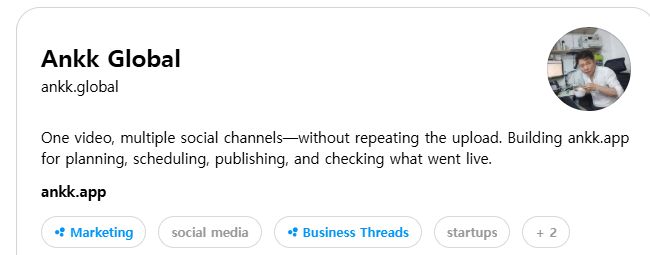
The public Ankk Global profile checked on September 3, 2026. Its name, ankk.global handle, English description, and link identify the same publishing operation.
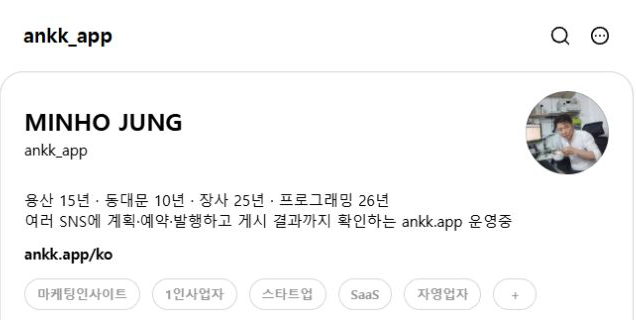
A brand may separate profiles by language or audience when that makes ownership and editorial scope clearer. This is one operating example, not a rule that every brand needs a profile for each language.
Ask these questions on the public profile:
- Can a new visitor tell who operates this account?
- Does the bio match the subjects the account will publish repeatedly?
- Is the link clearly personal, brand-owned, or client-owned?
- Are the profile image and handle distinct enough to prevent a wrong-account post?
- Does the intended public visibility remain correct when viewed from another account or while logged out?
Seven checks that prevent wrong-account publishing
When you manage several profiles, the easiest mistake is not always bad copy. It is publishing good copy from the wrong identity.
- Read the
@handle; do not rely on the small profile image. - Put the brand, language, and campaign in the internal working title.
- Match the opening sentence and link to the selected account's language and purpose.
- For client content, compare the composer with the approved final copy.
- Check the scheduled time and the timezone shown next to it.
- Review the profile name, body, and media order in the preview.
- After publishing, open the public profile and original post URL.
Similar logos and small avatars make account mistakes easier. Use the handle, language, destination link, and internal title together.
Design the client handoff before you request access
Client operations are less about whether you can log in and more about who remains responsible when the work changes hands.
Record before publishing begins
- The legal and practical account owner
- The primary contact and publishing approver
- The person responsible for recovery and two-factor authentication
- Approved topics, restricted language, and required disclosures
- Where source images, video, and copy are stored
- Who to contact first after a mistaken or urgent post
Return or confirm before the contract ends
- Account permissions and connected-device status
- A list of published content and original provider URLs
- Scheduled content and unpublished drafts
- Source files and approval records
- Confirmation that contractor access has been removed
Do not paste passwords or recovery codes into an ordinary operating document. Record who controls them and how they are changed or revoked.
When Threads is only one of several social channels
Switching between Threads profiles is different from publishing one idea to Threads, Instagram, YouTube, TikTok, or another network. Multichannel work adds account selection, channel-specific copy, media requirements, timing, and result checks.
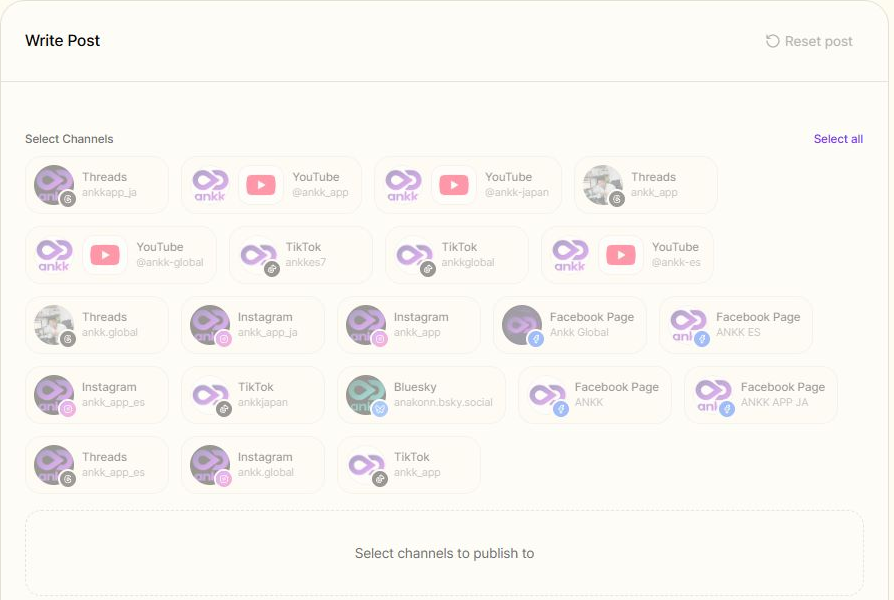
The current Ankk brand workspace in English, captured on September 3, 2026. The image is cropped to the channel selector and excludes the private account menu, email address, drafts, and private metrics.
Ankk is a social media management product for planning, scheduling, and publishing prepared content across multiple social networks without registering it separately in every channel. It does not own account credentials or decide account permissions for you. Establish ownership first, then select the exact connected account for each publishing job.
The current Ankk Threads support page describes connecting a Threads account, reviewing copy, links, and media, scheduling, and checking the final published or failed state. Support and connection status can change, so verify the current product page and workspace immediately before publishing.
A finished composer is not the same as a live post
Selecting the right account is only part of the job. Keep these states separate.
| State | Meaning | Next check |
|---|---|---|
| Draft or composing | Account, copy, and media are still being prepared | Recheck the handle, body, links, and media |
| Scheduled or processing | A future request or provider response is still pending | Check again after the scheduled time or processing step |
| Publicly live | The post opens on the provider's public profile | Verify the original URL, account, copy, and media |
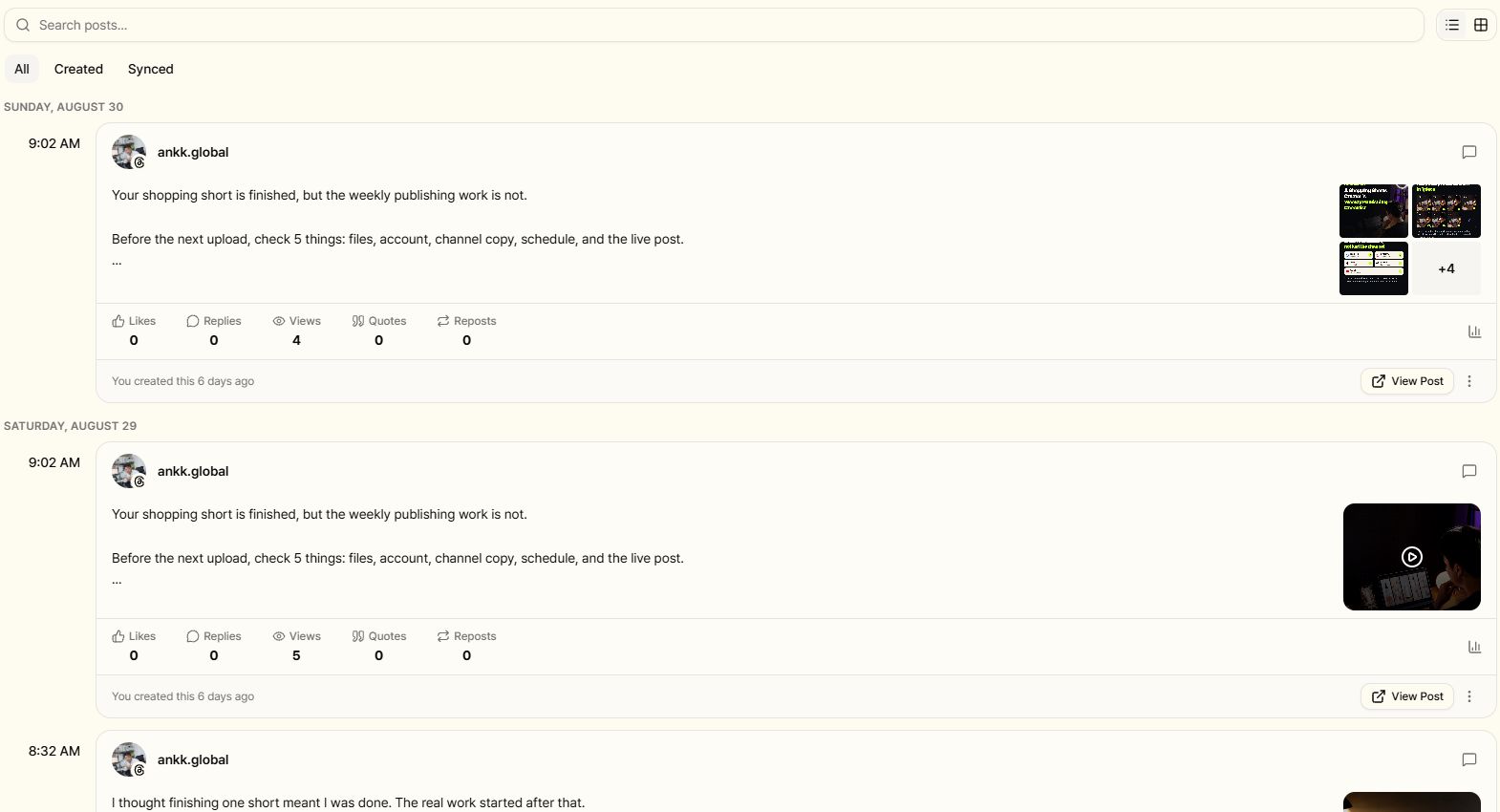
The current English Published view for the public Ankk Global Threads account. Final status and the path to the original social post are checked together.
For a deeper explanation, read Scheduled Is Not Published: How to Verify a Social Post.
Copyable Threads account-separation checklist
Before adding the account
- I defined whether this is a personal, brand, or client profile.
- The public name, handle, bio, and link have one clear purpose.
- The owner and recovery lead are documented.
- Two-factor authentication and access removal have an owner.
- The publishing approver and publishing operator are not confused.
Before publishing
- I checked the
@handle, not only the profile image. - The language, opening, link, and media match the selected account.
- Client content matches the approved copy.
- The scheduled time and timezone are correct.
- The preview shows the intended account, body, and media order.
After publishing
- The post appears on the intended public profile.
- The original URL opens under the correct handle.
- Line breaks, links, and media render as intended.
- I did not record scheduled or processing as publicly live.
- For client work, the original URL is in the approval or reporting record.
Frequently asked questions
How do I add another Threads account?
Use the account or profile options currently shown in Threads, Instagram, or Meta Account, then confirm the public name and handle before publishing. The 2026 Meta Account transition is gradual, so exact labels and menu locations can differ between users.
Do Instagram and Threads always use the same account?
Threads launched with Instagram-based sign-in and carried over the Instagram username and verification. Meta Account is now being introduced gradually, so do not assume an old tutorial describes your current connection. Read the identity shown in the current account screen and verify the public profile.
Must I separate my personal and brand Threads accounts?
No. One account can work when your expertise and brand story fit together and you alone own, recover, and approve the account. Consider separation when official communication, team access, client approval, or handoff responsibility differs.
Should an agency share a client's Threads password?
Do not make shared passwords the default operating method. Use the official permission and security options available to the client, then document ownership, recovery responsibility, approval, and access removal.
Is checking the selected account enough?
No. A correct account can still have a scheduled, processing, failed, or incorrectly rendered post. Check the final status and open the provider's original URL before recording the job as publicly complete.
Sources and verification scope
This guide was reviewed on September 3, 2026 using these official sources and current public screens:
- Meta Account rollout and shared account settings
- Meta's original introduction to Threads
- Threads brand resources and logo guidance
- Ankk's current Threads support scope
- Ankk's content composer guide
Meta Account, Threads menus, and Ankk support can change. Recheck the current interfaces and official guidance before adding an account or publishing.
Next step
Connect your social channels and prepare the next post
First, label the profile as personal, brand-owned, or client-owned. If the same content will go to several social networks, define account responsibility before you select each channel and confirm the final live result.