
Cross-posting to Instagram and Threads starts with one decision: share the same content, or give each channel its own copy and schedule? For a simple workflow within Meta, check your account’s built-in options first. Separate app publishing or a multi-channel tool becomes useful when you manage more accounts, other social networks, or different messages. “At the same time” means preparing or requesting several destinations together; it does not guarantee publication on every network at the same second.
Checked November 11, 2026. We inspected Meta Business Suite and ANKK on desktop web. Screens here use @ankk.global and English UI. Sharing settings were not changed and nothing was published to social networks.
1. Compare three ways to publish
| Method | Best fit | Check first |
|---|---|---|
| Meta sharing | Similar content for linked Meta accounts | Available destinations, formats and scheduling options |
| Separate apps | A few accounts and native editing tools | Manage each caption, media file and time separately |
| ANKK | Supported networks and accounts in one workflow | Connection permissions, format rules and each final result |
Meta sharing does not publish to YouTube, TikTok or Bluesky. If you only use Instagram and Threads and the right sharing option is available, you may not need a paid external tool. Native music and effects can also be a good reason to finish a post in its original app.
2. Check the actual destinations in Business Suite
On desktop, open Meta Business Suite, choose the correct account, then open Create post → Post to. Check the Facebook Page name and Instagram handle before preparing copy and supported media. Look at Share to below the editor. If Threads appears, read its target handle and visibility. We saw Share to Threads → ankk_app on the Korean account. The corresponding option was absent on the English, Japanese and Spanish accounts during this check. You can prepare separate posts instead of changing account connections or permissions just to reproduce a screenshot.
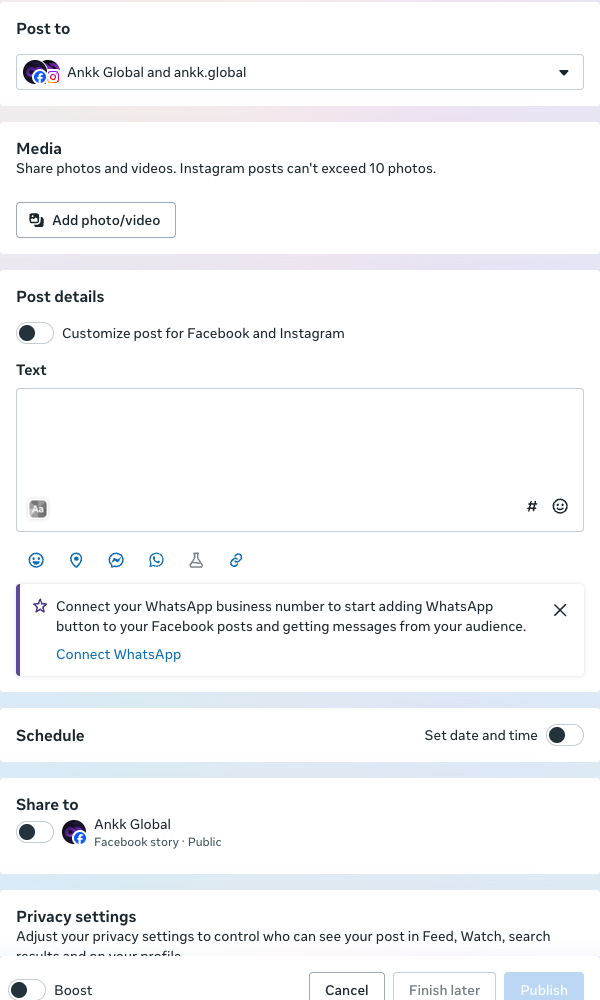
Facebook/Instagram copy customization and Threads sharing are separate controls. A customization switch for the first two does not prove that Threads has an independent caption field. When scheduling, check the time zone and whether sharing remains available for the selected format on the final screen. We inspected the controls; we did not publish every media and schedule combination.
Meta’s 2026 announcement includes Threads cross-posting through Business Suite. Sharing a Threads post to an Instagram Story, copying it as an image, and having it recommended in another Meta app are different features. Recommendation placement does not mean a new Instagram feed post was created.
3. Reuse the idea, adapt the caption
For a photo of plants by a window, Instagram can carry the setting and useful detail; Threads can start a conversation. These are example drafts, not published posts.
Instagram example
Same window, different greens. Two small plants gave this desk a fresh look. Choose a plant that fits your light and care routine.
Threads example
One plant or two on your desk? Which would you choose?
Check how each channel handles hashtags, links, line breaks, mentions and alt text. An Instagram caption URL does not behave like a clickable Threads link. Review cropping and aspect ratio in each preview. The photo upload and size guide covers source images and carousel order.
4. Customize the copy in ANKK
- Open New post in the correct brand and select only the Instagram and Threads accounts you need. Verify the handles before using any select-all option.
- Enter a shared draft to reveal Customize per channel, then open the account-specific editors.
- Give Instagram the descriptive caption and Threads the shorter question. Prepare media that meets each destination’s requirements.
- Review previews and warnings. Our captures show the editor before media is attached, so Instagram correctly reports a missing-media warning. That is input validation, not a failed publication.
- For scheduling, review the date and time zone before confirming acceptance. This composer applies a shared time to the selected targets; prepare separate jobs when channels need different times.
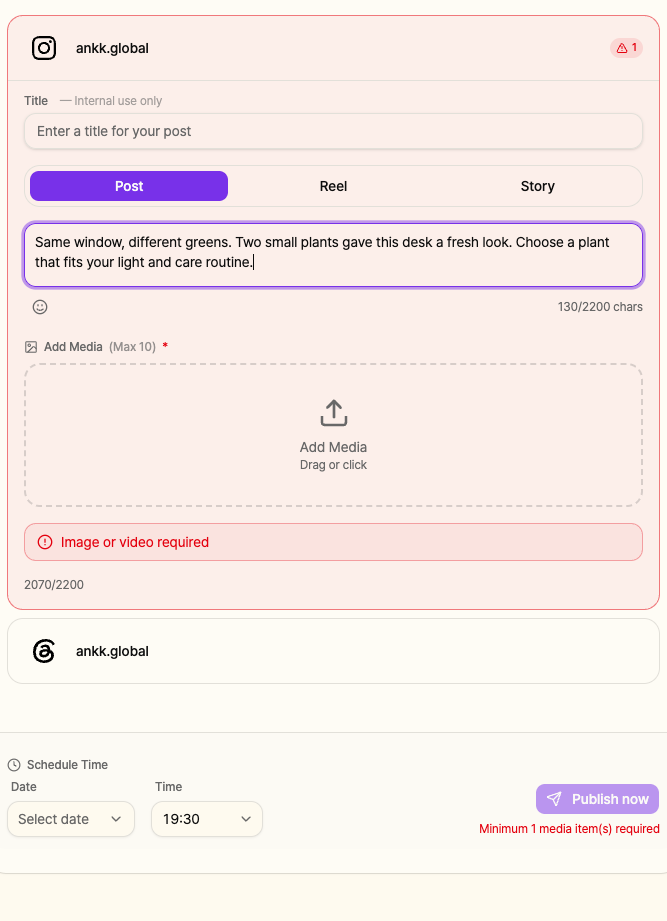
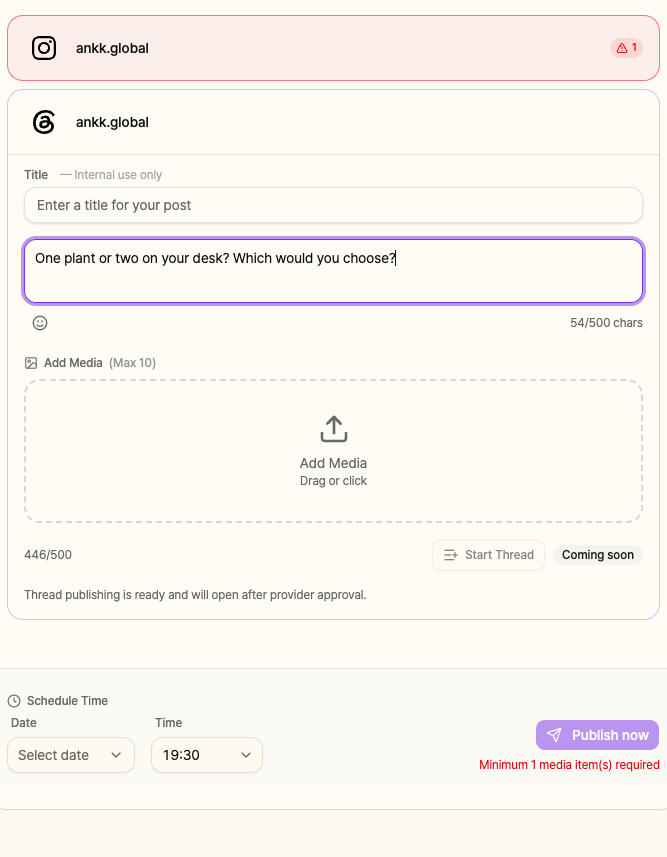
We entered the two example captions only in the browser editor, then reset it. We did not upload media, save, schedule or publish. Check multi-channel publishing, Instagram support and Threads support for the product’s scope. Availability also depends on the connection, release status and permission. Our connection check showed general Threads publishing available and chained threads marked coming soon.
5. Treat Reels, Shorts and TikTok as a separate checklist
| Destination | Current ANKK input | Review before sending |
|---|---|---|
| Instagram Reels | Reel type with one video | Account permissions, framing and music/effect rights |
| YouTube | One video and a title | Visibility, copyright and Shorts classification |
| TikTok | Business connection with one video or a photo post | Publishing access, privacy and commercial disclosure |
Do not assume that music, stickers or cover settings in one app transfer to another network. Use your own source file and assets you have permission to use on each service. Downloading TikTok content to move it to another service is outside this workflow.
ANKK uses TikTok API for Business Accounts. Video and photo publishing were released and authorized on the connection we checked; that does not prove every account can publish successfully. Do not substitute general TikTok Content Posting API or TikTok Social MCP authorization rules. YouTube classifies square or vertical videos meeting its current duration and other rules as Shorts. Sending the same file does not guarantee classification, monetization or public visibility.
6. Check partial success before retrying
| Status | What it means | Next step |
|---|---|---|
| Scheduled or accepted | The plan or request was saved | Check accounts and time |
| Processing or unknown | The public outcome is not settled | Read the existing result and check the original network |
| Published | A post was created for that target | Open its original link and review content and visibility |
| Failed or needs attention | That target needs action | Fix the cause and retry only eligible targets |
If Instagram succeeded and Threads failed, do not send Instagram again as part of a new job. Separate success from an unresolved outcome first. Treating an unknown result as a simple failure can create duplicates. The publication result guide explains what to verify. Retry conditions vary; a fixed retry count or zero missed posts cannot be promised for every network error.
7. Frequently asked questions
Can I cross-post for free?
Start with built-in sharing if your account offers it. Compare tools when managing copy, schedules and outcomes across accounts becomes more work. This guide does not compare competitor pricing.
What if the Threads option is missing?
Check the app version, active account, connection and format. Our Business Suite menus differed by account. You can write separate posts now and use the Threads scheduling guide or Instagram scheduling troubleshooting when needed.
Does editing or canceling update both networks?
Check each destination’s result. Canceling a future schedule, stopping a request already in progress, and editing or deleting a public post are different actions. Verify what the original tool and network currently support.
Official sources and test scope
- Meta’s 2026 Business Suite and Threads cross-posting announcement
- Meta on recommendations across its apps
- Copying a Threads web post as an image
- YouTube Shorts classification rules
- Official TikTok API for Business Accounts overview
Checked on November 11, 2026 against official announcements, real web UI, current ANKK input rules and stored connection readiness. This was a composer and menu inspection, not a successful public publishing test for every combination.